Pin this post to Pinterest! ☝🏻
How to Change Your Site Title in Squarespace (Step by Step)
Most people spend as much time thinking about their Squarespace site title as they do which socks to wear - which is to say, basically zero. I mean, you can’t even see the site title once you upload the logo, so how much could it possibly matter?
More than you'd think.
Your site title, which is the name that identifies your website behind the scenes, is working even when nobody can see it.
WHERE DOES THE SITE TITLE APPEAR?
Browser tab
Search engine results
Social share previews
Top navigation header (if you don't have a logo uploaded)
Do I need a site title if I already have a logo?
Yes, because even though your logo replaces the site title visually in the header, your site title is still working behind the scenes in your browser tab, Google search results, and social share previews.
A default or vague site title is a missed SEO opportunity that takes 30 seconds to fix.

What should your site title actually say?
Typically, your site title should follow this format:
Business name | What you do
For example, here's how my name shows up in Google search results:
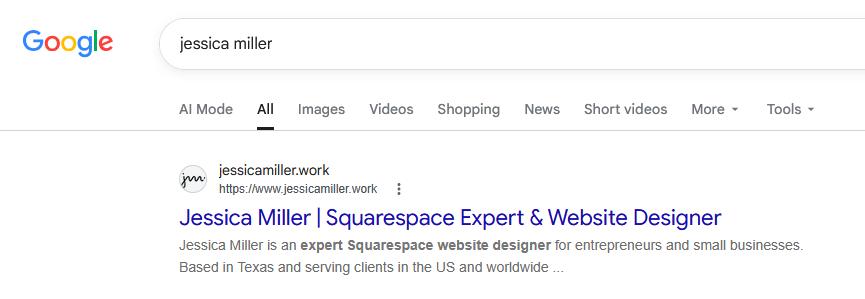
Using only my name for the site title would be too generic - it doesn't explain what I do - which is why it helps to include the second part in your site title.
Here are some other examples:
Root and Rise | Registered Dietitian
Grace Community Church | Memphis Tennessee
The Sound Studio | Music Producer in Los Angeles
When should you not follow this format? If your business name explains what you do.
For example:
Austin Wedding Films
Nashville Music Lessons
Bloom Floral Shop
All of those business names explain what they do, so there's no need to repeat it again.
Your site title is one of those things that takes two minutes to set up correctly and can easily work against you for years if you don't.
How to change your site title in Squarespace
Let's go over where to update your title.
Click Edit to edit the page, then hover over the header at the top and click Edit Site Header.

Next, click Your Site Title and click the pencil icon.
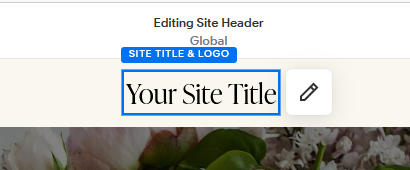
From here you can change the name of your site title.
While you're here, go ahead and upload your logo. You can also set the height for the desktop and mobile versions. To see how it looks on mobile, click the mobile icon in the top right corner (between the computer screen icon and the paintbrush).
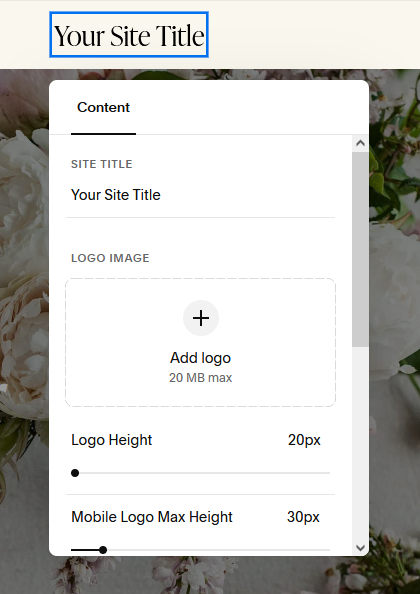
Once you upload your logo, you'll no longer see the site title. But just know that it's still doing it's job in the background.
Does changing the site title affect SEO?
Yes, and it's one of the easiest SEO wins you can make. Your site title is one of the first things Google uses to understand what your website is about, so if it's vague or generic, you're leaving a quick and easy win on the table.
That said, changing your site title alone won't suddenly rocket you to page one. SEO is a combination of a lot of factors working together, and your site title is just one piece of the puzzle. If you want to know exactly how your site is performing, SEOSpace is the tool I use and recommend. It's helped my site tremendously in showing up in Google search results.
Want even more SEO tips? Download this free SEO Checklist below -

*This post may contain affiliate links, so I may earn a small commission when you make a purchase through links on this site at no additional cost to you.